threejs-grass
threejs-grass
Infinite, terrain-aware grass for three.js and react-three-fiber, built on WebGPU (TSL).
Live demo (three.js) · Live demo (React Three Fiber) · API docs · Website
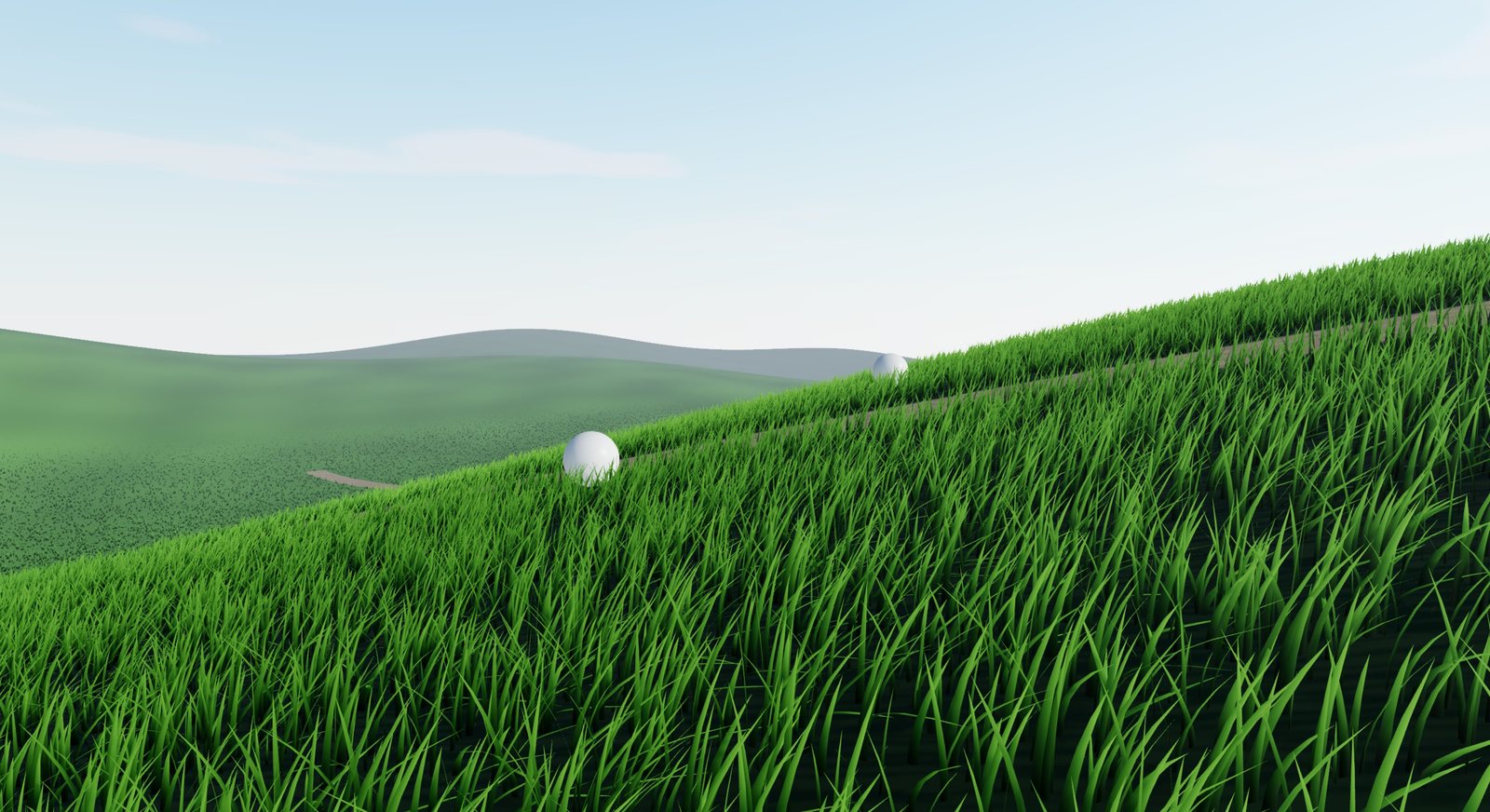
- Infinite grass: a tiled field that streams around the camera, so you never build one giant mesh.
- Performance: four configurable LODs, per-cell density allocation, smooth blade-by-blade thinning, frustum-culled tiles, and a time-budgeted tile builder.
- 12 presets: eight inspired by real species (Kentucky Bluegrass, Perennial Ryegrass, Tall Fescue, …) and four stylized looks.
- Two grass types: detailed geometric blades, or lightweight billboard tufts.
- Terrain aware: pass a mesh (baked into a heightfield automatically) or a height function. Grass follows slopes and skips terrain that is too steep.
- Natural wind: direction, strength, noise scale and speed, with gusts that roll across the field.
- Interaction: up to 16 objects push grass aside.
- Grass maps: control where grass grows and how tall it is, for paths, clearings and fields.
- Terrain painter: paint coverage and height directly on the terrain.
- Realistic shading: clumping, field-scale colour patches, back-lit translucency, tinted sheen, root occlusion, shadows.
const grass = await Grass.create({ camera, scene, renderer, terrain, tileSize: 25, maxDistance: 200 })
That's it. The grass updates itself every time the scene renders.
WebGPU only. Use
WebGPURendererfromthree/webgpu. It falls back to WebGL2 by itself when WebGPU is unavailable. ClassicWebGLRendereris not supported. Tested with three r186.
Live demos
Both demos run in the browser and expose every feature: presets, blade style (height up to 3 m), wind, the four LODs with a debug tint, the terrain painter (add, erase, raise, lower, save), lighting and bloom. Two balls roll through the field to show interaction, and a minimap shows the grass map.
| three.js demo | React Three Fiber demo |
|---|---|
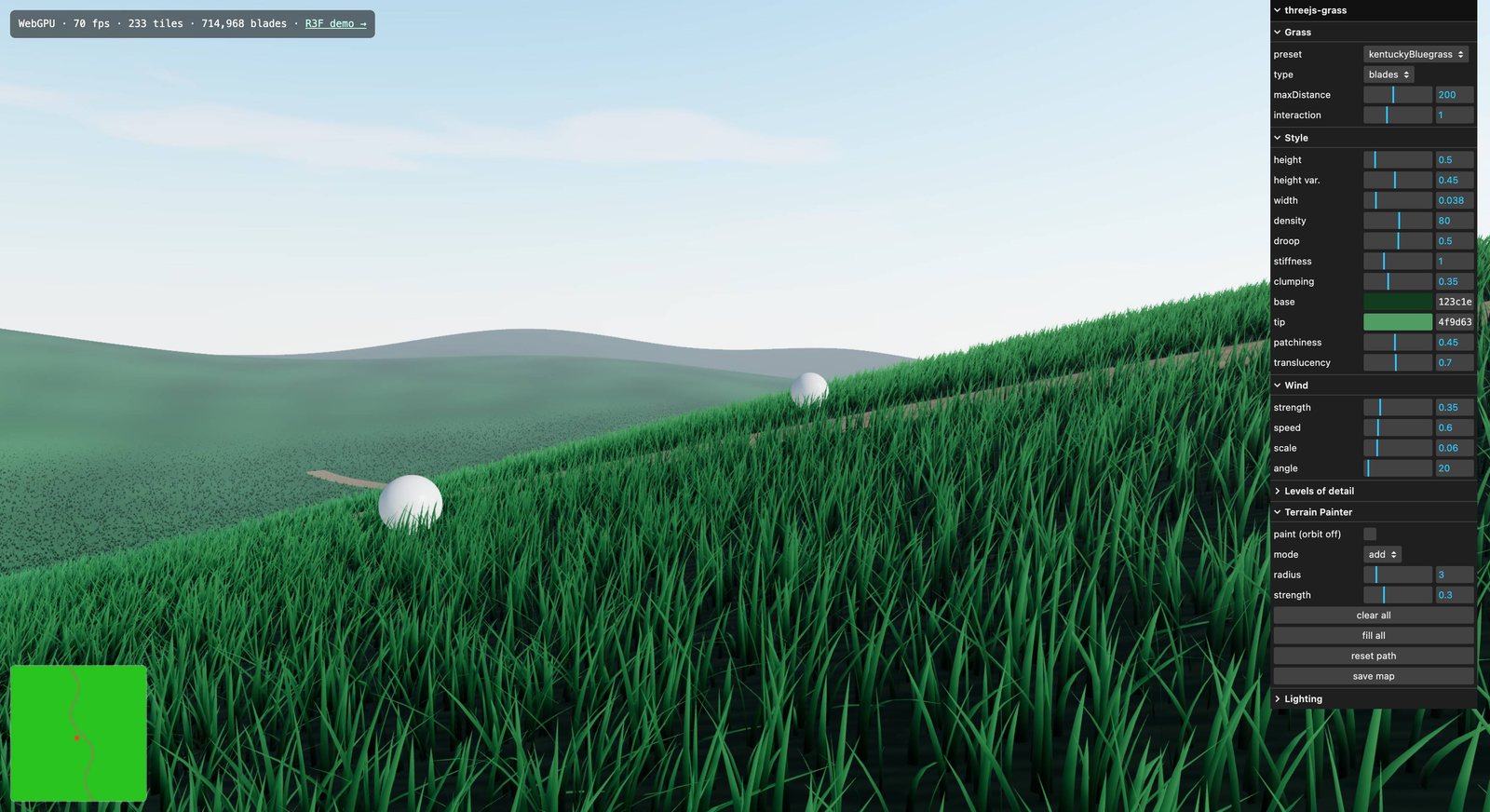 |
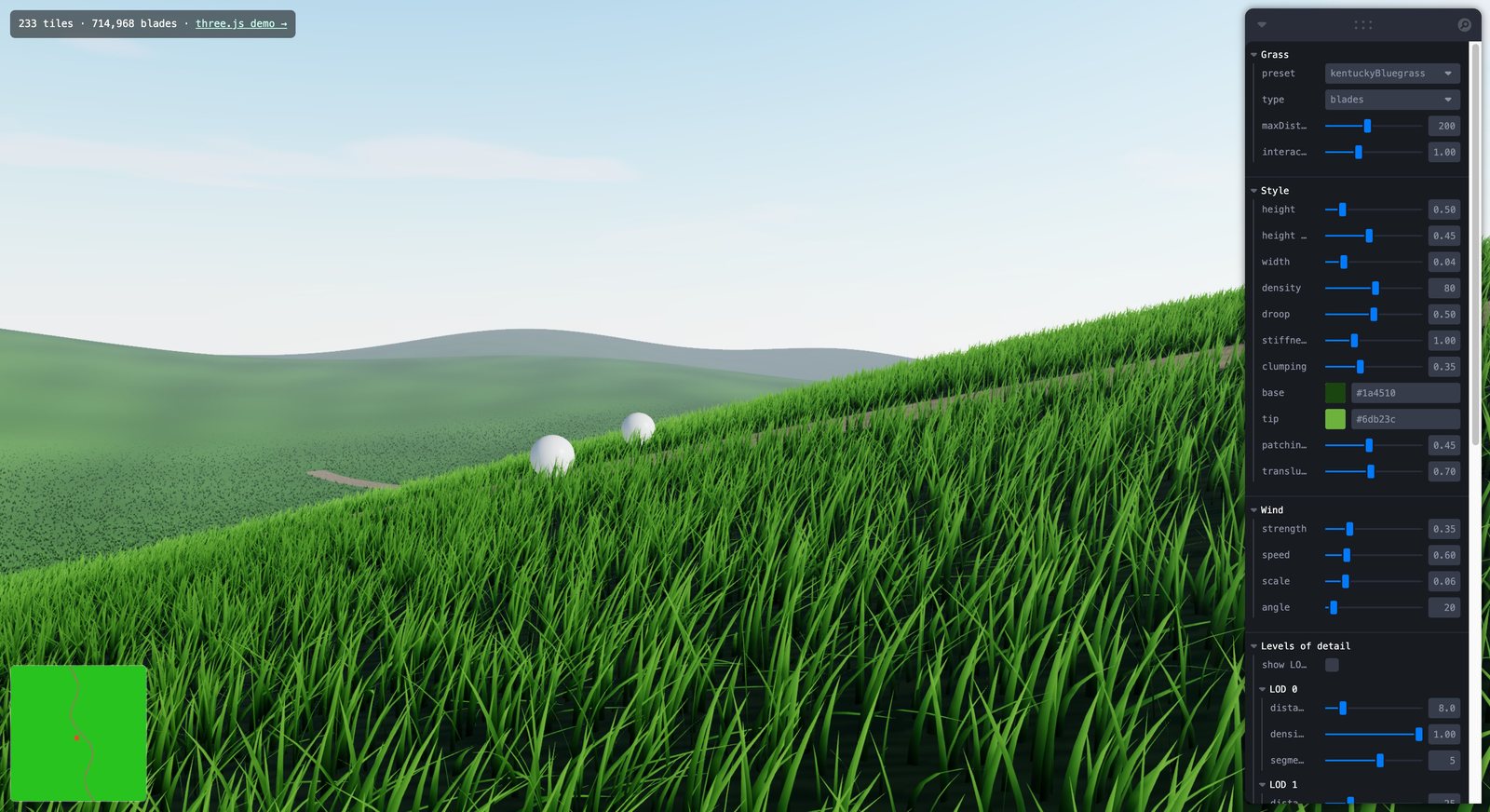 |
Plain three.js + lil-gui · source |
<Grass> component + leva · source |
Tip: open the Levels of detail folder and turn on show LODs, or switch on paint in the Terrain Painter folder and drag across the field.
Gallery
All of these were captured from the demos. Click any image to open the live demo.
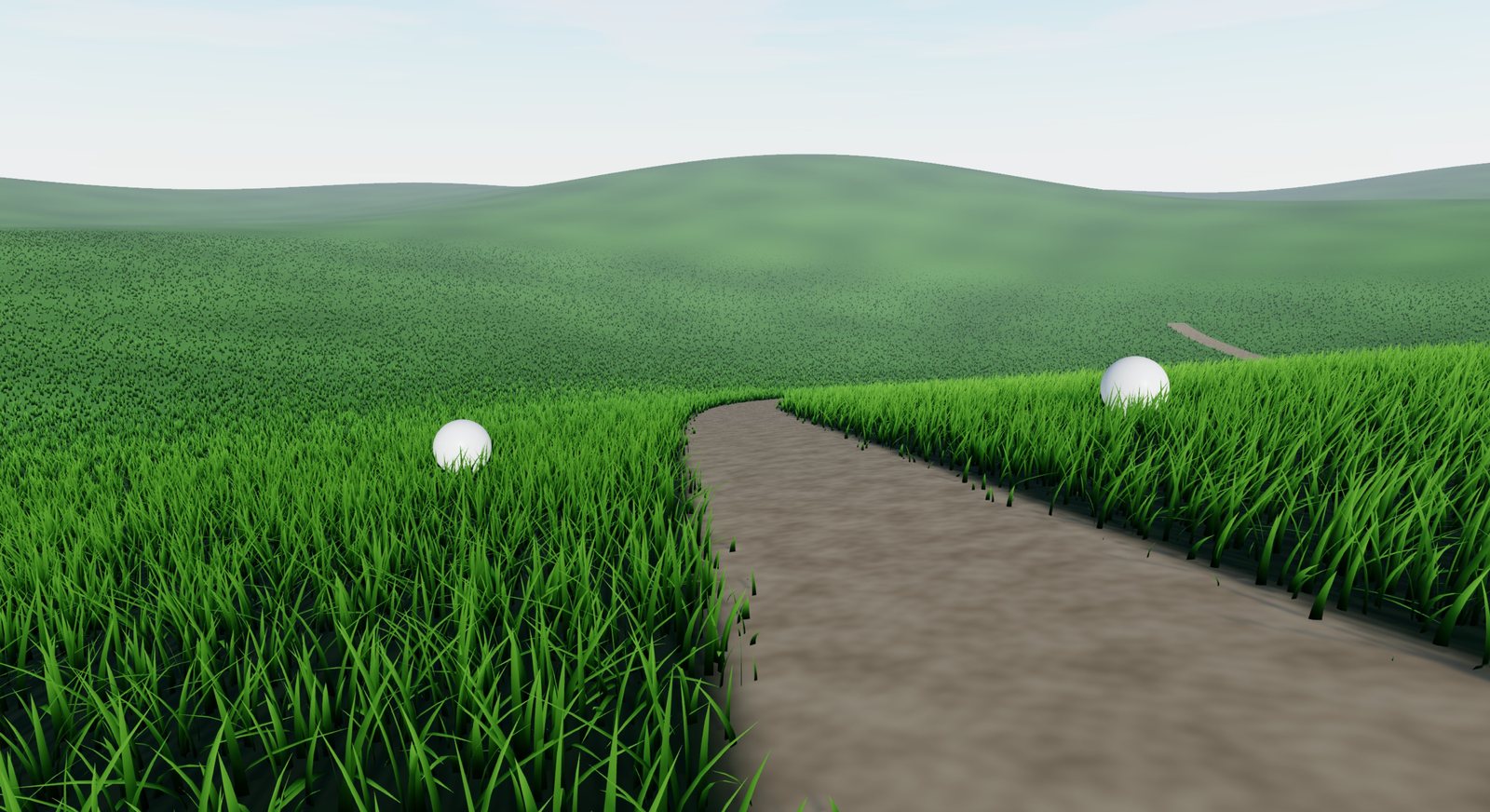 Grass maps: paths and clearings Grass maps: paths and clearings |
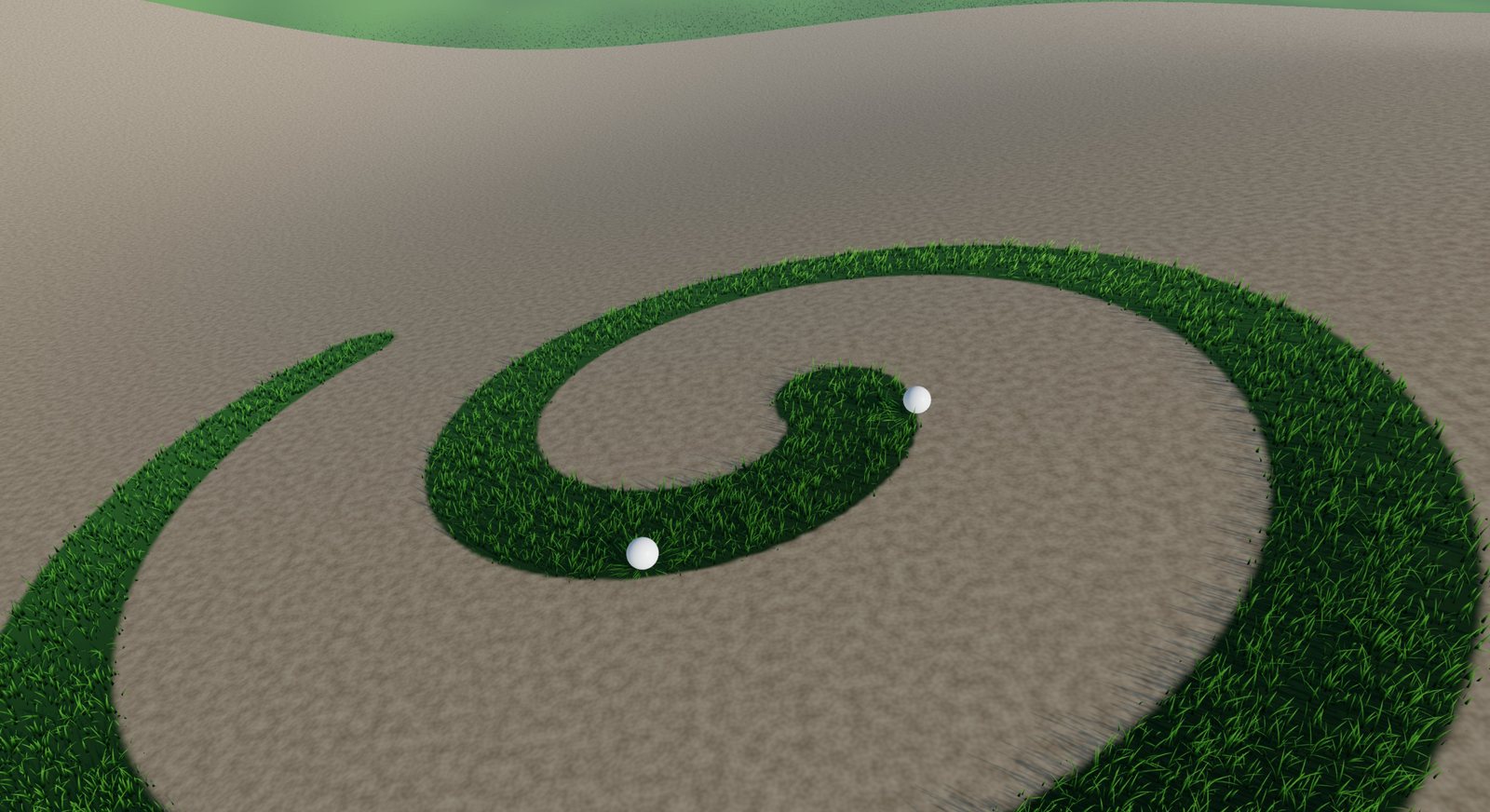 Terrain painter: paint grass in the scene Terrain painter: paint grass in the scene |
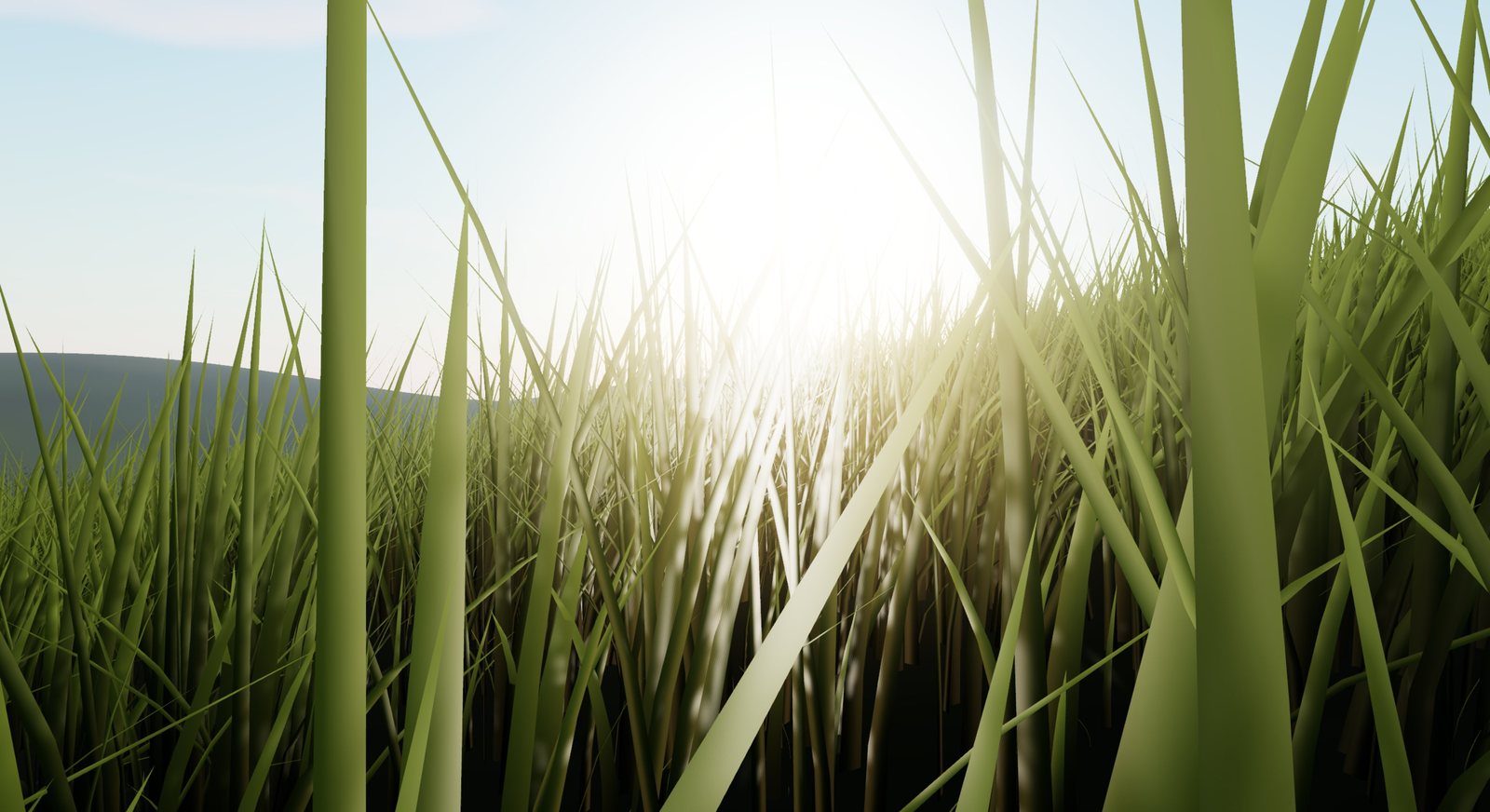 Tall grass, back-lit translucency Tall grass, back-lit translucency |
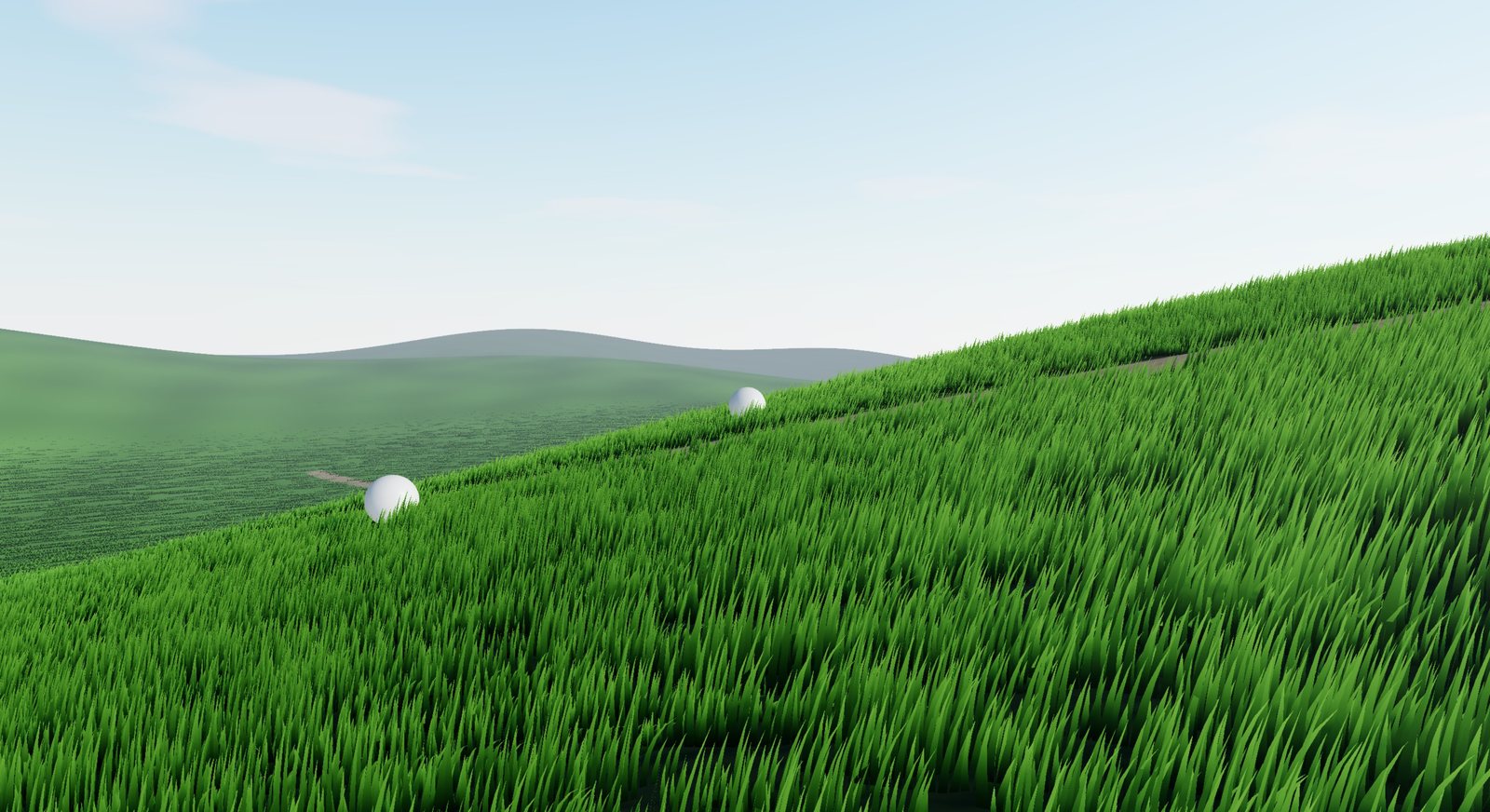 Billboard grass: the lightweight type Billboard grass: the lightweight type |
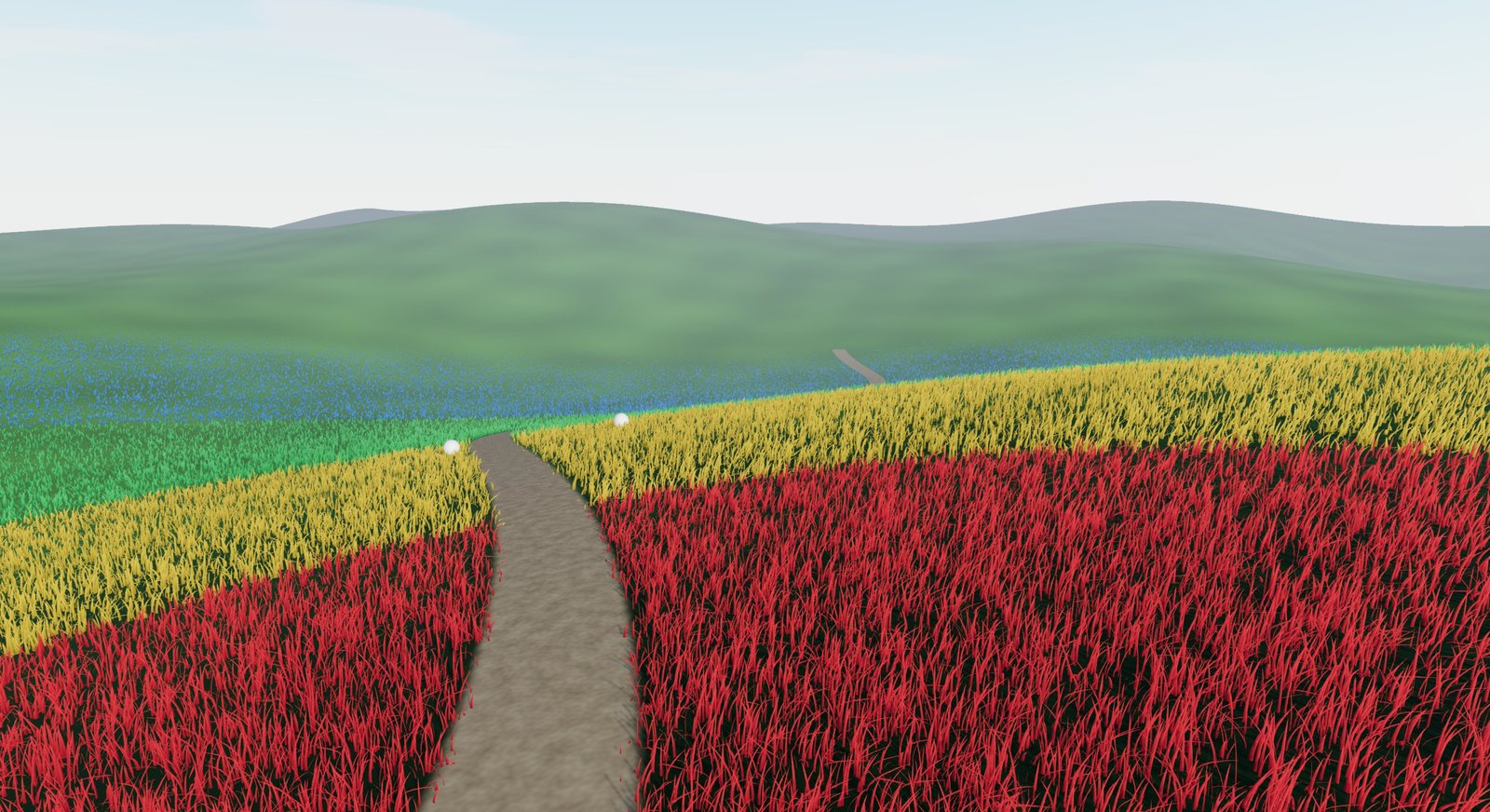 Four LODs ( Four LODs (debugLods) |
React Three Fiber demo with leva controls |
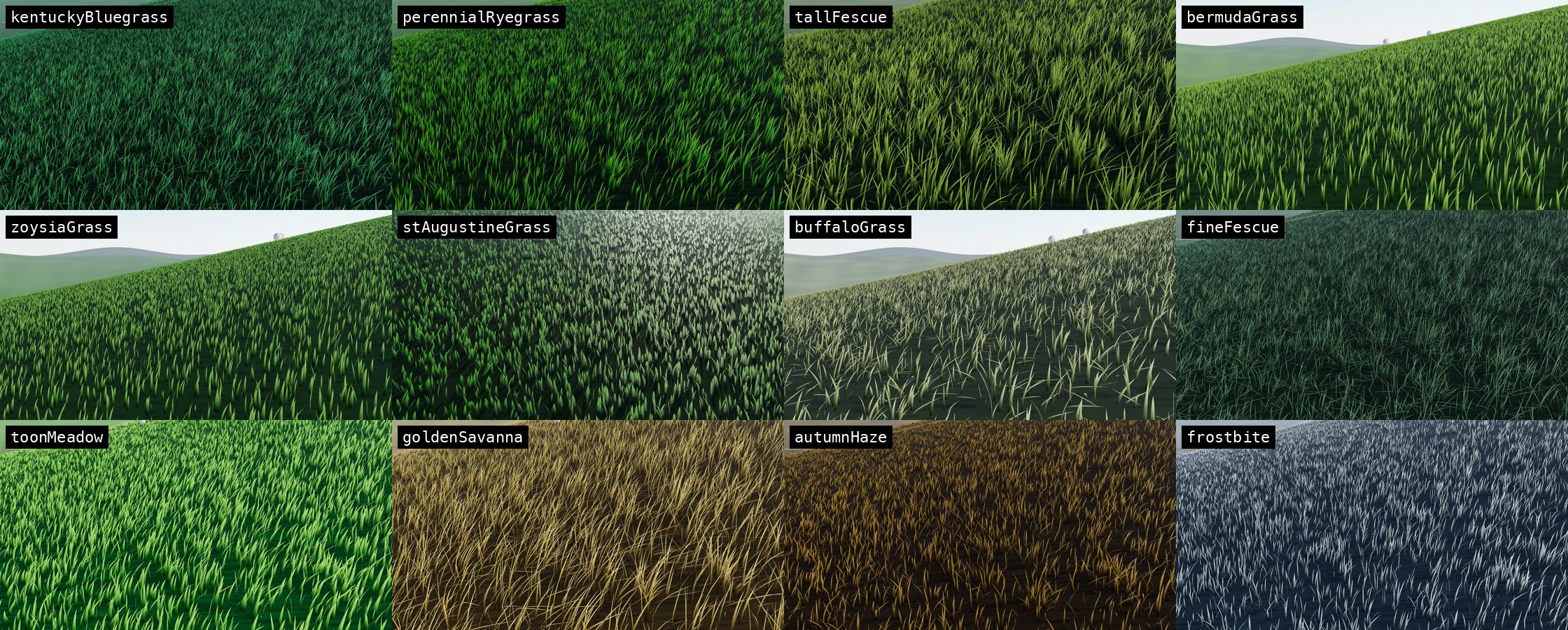 The 12 presets. Top row: Kentucky Bluegrass, Perennial Ryegrass, Tall Fescue, Bermuda. Middle row: Zoysia, St. Augustine, Buffalo, Fine Fescue. Bottom row: Toon Meadow, Golden Savanna, Autumn Haze, Frostbite.
Contents
- Live demos
- Gallery
- Install
- Quick start: three.js
- Quick start: react-three-fiber
- Concepts
- API
Grass- Settings (
GrassOptions/GrassInput/GrassSettings) GrassLOD·WindOptions·Interactor·GrassRendererpresets,PresetName,GrassStyleGrassMap·GrassMapOptionsTerrainPainter·Brush,BrushMode- Terrain helpers:
createHeightSampler,bakeHeightfield,raycastHeight,slopeAt,HeightFn,Terrain - Geometry:
createBladeGeometry,createBillboardGeometry - Shader access:
GrassUniforms,GrassMapSample,MAX_INTERACTORS - React:
<Grass>,GrassProps,GrassImpl
- Performance tips
- Running the demos
Install
npm i threejs-grass three
# for React:
npm i @react-three/fiber react
Entry points:
| Import | Contents |
|---|---|
threejs-grass |
Everything framework-agnostic |
threejs-grass/react |
The <Grass> component, plus everything from threejs-grass (the class is exported as GrassImpl) |
Quick start: three.js
import * as THREE from 'three/webgpu'
import { Grass } from 'threejs-grass'
const renderer = new THREE.WebGPURenderer({ antialias: true })
document.body.appendChild(renderer.domElement)
const scene = new THREE.Scene()
const camera = new THREE.PerspectiveCamera(50, innerWidth / innerHeight, 0.1, 2000)
scene.add(new THREE.HemisphereLight('#dff1ff', '#3b4a22', 1), new THREE.DirectionalLight('#fff', 3))
const terrain = new THREE.Mesh(myTerrainGeometry, new THREE.MeshStandardNodeMaterial({ color: '#2a3d16' }))
scene.add(terrain)
const grass = await Grass.create({ camera, scene, renderer, terrain, tileSize: 25, maxDistance: 200 })
renderer.setAnimationLoop(() => renderer.render(scene, camera)) // grass updates via scene.onBeforeRender
Quick start: react-three-fiber
import * as THREE from 'three/webgpu'
import { Canvas, extend, type ThreeToJSXElements } from '@react-three/fiber'
import { useRef } from 'react'
import { Grass } from 'threejs-grass/react'
declare module '@react-three/fiber' {
interface ThreeElements extends ThreeToJSXElements<typeof THREE> {}
}
extend(THREE as any)
function Scene() {
const terrain = useRef<THREE.Mesh>(null)
return (
<>
<hemisphereLight args={['#dff1ff', '#3b4a22', 1]} />
<directionalLight position={[30, 50, 20]} intensity={3} />
<mesh ref={terrain} geometry={myTerrainGeometry}>
<meshStandardNodeMaterial color="#2a3d16" />
</mesh>
<Grass terrain={terrain} preset="kentuckyBluegrass" tileSize={25} maxDistance={200} />
</>
)
}
export default () => (
<Canvas gl={async (props) => { const r = new THREE.WebGPURenderer(props as any); await r.init(); return r }}>
<Scene />
</Canvas>
)
Concepts
Tiles. The XZ plane is split into tileSize squares. Every frame, tiles within maxDistance of the camera are kept, and tiles outside are disposed. Each tile is one instanced draw call, frustum-culled as a whole.
Cells and LODs. Each tile is split into cells of about 5 m. A cell holds only as many blades as its distance needs, according to the four lods. In the shader, density is interpolated smoothly between LODs, and blades are removed one by one in a fixed random order. Thinning never pops and never reshuffles. Remaining blades get wider so coverage stays constant. Each LOD also sets the blades' vertical segments.
Determinism. Blade placement depends only on world position and settings, so a revisited area looks exactly the same.
Terrain. A mesh is baked once into a heightfield by CPU rasterisation, which works for any geometry including transformed groups. A height function (x, z) => y is called directly, which suits infinite procedural worlds. Grass is skipped where the height is NaN (off the mesh) or where the slope exceeds maxSlope.
Grass map. An optional world-space texture: R controls coverage (thinning), G controls height. Edits are live because the map is sampled on the GPU.
API
Every entry below has a three.js (vanilla) example and a React Three Fiber example. R3F snippets
assume a <Canvas> with a WebGPURenderer as in Quick start: react-three-fiber,
plus const terrain = useRef<THREE.Mesh>(null) on your ground mesh.
Grass
An infinite, camera-centred grass field. In R3F, use the <Grass> component, which creates
this class for you. The class itself is exported as GrassImpl from threejs-grass/react.
class Grass {
static create(options: GrassOptions): Promise<Grass>
constructor(options: GrassOptions)
readonly object: THREE.Group // root of all tiles; added to `scene` if you passed one
readonly uniforms: GrassUniforms // shader uniforms (advanced)
readonly stats: { tiles: number; instances: number }
camera: THREE.Camera // may be swapped at any time
settings: GrassSettings // resolved settings (read-only — use set())
sampleHeight: HeightFn // terrain height at (x, z); NaN off-terrain
set(input: GrassInput): this
reset(input?: GrassInput): this
setTerrain(terrain?: Terrain): void
update(budgetMs?: number): void
dispose(): void
densityAt(distance: number): number
mapNode(worldXZ: Node<'vec2'>): GrassMapSample
}
Grass.create(options)
Validates the renderer, initialises it if needed, creates the field and builds every visible tile so the
first frame is complete. Throws if renderer is not a WebGPURenderer. See Settings.
three.js
import { Grass } from 'threejs-grass'
const grass = await Grass.create({ camera, scene, renderer, terrain, preset: 'tallFescue', maxDistance: 150 })
React Three Fiber
import { Grass } from 'threejs-grass/react'
<Grass terrain={terrain} preset="tallFescue" maxDistance={150} />
new Grass(options)
Takes the same options as create, but skips renderer validation and the initial full build, so tiles
stream in over the next frames. Prefer Grass.create.
three.js
const grass = new Grass({ camera, terrain })
scene.add(grass.object)
renderer.setAnimationLoop(() => { grass.update(); renderer.render(scene, camera) })
React Three Fiber
// Only needed if you want to manage the instance yourself:
import { GrassImpl } from 'threejs-grass/react'
function ManualGrass() {
const camera = useThree((s) => s.camera)
const grass = useMemo(() => new GrassImpl({ camera, preset: 'bermudaGrass' }), [camera])
useEffect(() => () => grass.dispose(), [grass])
useFrame(() => grass.update())
return <primitive object={grass.object} />
}
grass.set(input)
Changes any settings at runtime and returns this.
- Visual settings (colours, height, width, droop, wind, LOD distances,
debugLods, interaction, translucency, …) apply instantly through uniforms. - Layout settings (
type,density,heightVariation,widthVariation,clumping,clumpSize,maxSlope,lods,tileSize) rebuild tiles in the background. Old blades stay visible until each tile is rebuilt.
Values merge into what was set before and persist across calls. undefined values are ignored, and
wind merges field by field. To drop earlier overrides, use reset.
three.js
grass.set({ preset: 'goldenSavanna', bladeHeight: 1.6, wind: { strength: 0.8 } })
React Three Fiber
// Just change props; the component applies them for you.
const [tall, setTall] = useState(false)
<Grass terrain={terrain} preset="goldenSavanna" bladeHeight={tall ? 1.6 : 0.8} wind={{ strength: 0.8 }} />
grass.reset(input?)
Replaces all settings with input. Anything not given falls back to the preset, then to the defaults. Use
it to switch presets cleanly after overriding style fields such as colours. <Grass> uses it internally,
so props are declarative: removing a prop reverts it.
three.js
grass.set({ preset: 'tallFescue', tipColor: '#ff0000' })
grass.set({ preset: 'frostbite' }) // still red tips: set() merges
grass.reset({ preset: 'frostbite' }) // frostbite exactly as designed
React Three Fiber
// Props are reset() each render: when `highlight` turns off, tipColor returns to the preset's colour.
<Grass terrain={terrain} preset="frostbite" tipColor={highlight ? '#ff0000' : undefined} />
grass.setTerrain(terrain?)
Swaps the terrain (mesh, group or height function) and regenerates all tiles.
three.js
grass.setTerrain((x, z) => Math.sin(x * 0.05) * 3)
grass.setTerrain(otherTerrainMesh)
React Three Fiber
// Swap the `terrain` prop to another object/ref, or call setTerrain through the ref:
const grass = useRef<GrassImpl>(null)
<Grass ref={grass} terrain={terrain} />
// later:
grass.current?.setTerrain((x, z) => Math.sin(x * 0.05) * 3)
grass.update(budgetMs?)
Re-centres tiles on the camera, streams tiles in and out, and refreshes interactors, the sun direction and
stats. budgetMs (default settings.buildBudget) caps time spent building tiles this frame.
three.js
// Automatic when `scene` was passed to create(). Otherwise, once per frame:
renderer.setAnimationLoop(() => { grass.update(); renderer.render(scene, camera) })
React Three Fiber
// <Grass> already calls update() in useFrame. With GrassImpl directly:
useFrame(() => grass.update())
grass.dispose()
Removes the grass from its parent, unhooks the scene, and frees GPU resources.
three.js
grass.dispose()
React Three Fiber
// <Grass> disposes on unmount — just stop rendering it:
{showGrass && <Grass terrain={terrain} />}
grass.densityAt(distance)
Returns the fraction (0..1) of full density at a distance from the camera. This is the CPU mirror of the shader's LOD curve.
three.js
console.log(grass.densityAt(10), grass.densityAt(100)) // e.g. 0.88, 0.04
React Three Fiber
const grass = useRef<GrassImpl>(null)
useEffect(() => console.log(grass.current?.densityAt(50)), [])
<Grass ref={grass} terrain={terrain} />
grass.mapNode(worldXZ)
Returns TSL nodes { coverage, height } that read the grass map at a world position. Use them in your
terrain material to show dirt where grass was erased. They track painting and grassMap swaps live.
three.js
import { mix, positionWorld, vec3 } from 'three/tsl'
const { coverage } = grass.mapNode(positionWorld.xz)
terrain.material.colorNode = mix(vec3(0.45, 0.35, 0.22), vec3(0.1, 0.16, 0.05), coverage)
terrain.material.needsUpdate = true
React Three Fiber
import { mix, positionWorld, vec3 } from 'three/tsl'
const [grass, setGrass] = useState<GrassImpl | null>(null)
useEffect(() => {
if (!grass || !terrain.current) return
const material = terrain.current.material as THREE.MeshStandardNodeMaterial
material.colorNode = mix(vec3(0.45, 0.35, 0.22), vec3(0.1, 0.16, 0.05), grass.mapNode(positionWorld.xz).coverage)
material.needsUpdate = true
}, [grass])
<Grass ref={setGrass} terrain={terrain} grassMap={map} />
grass.sampleHeight(x, z)
Returns the terrain height the grass uses, which is handy for placing objects on the ground. Returns NaN off-terrain.
three.js
ball.position.y = grass.sampleHeight(ball.position.x, ball.position.z) + 0.5
React Three Fiber
const grass = useRef<GrassImpl>(null)
const ball = useRef<THREE.Mesh>(null)
useFrame(() => {
const g = grass.current, b = ball.current
if (g && b) b.position.y = g.sampleHeight(b.position.x, b.position.z) + 0.5
})
<Grass ref={grass} terrain={terrain} />
grass.stats
{ tiles, instances }, refreshed on every update.
three.js
hud.textContent = `${grass.stats.tiles} tiles · ${grass.stats.instances} blades`
React Three Fiber
const grass = useRef<GrassImpl>(null)
useFrame(() => grass.current && (hud.current!.textContent = `${grass.current.stats.instances} blades`))
grass.object, grass.camera, grass.settings, grass.uniforms
objectis theGroupcontaining all tiles.cameracan be reassigned.settingsis the resolved configuration. Read it, and change it withset().uniformsis covered under Shader access.
three.js
grass.camera = carCamera // follow another camera
grass.object.visible = false // hide all grass
console.log(grass.settings.bladeHeight)
React Three Fiber
const grass = useRef<GrassImpl>(null)
useEffect(() => { if (grass.current) grass.current.object.visible = false }, []) // hide all grass
<Grass ref={grass} camera={carCamera} terrain={terrain} /> // follow another camera
Settings
GrassOptionsis passed toGrass.create:GrassInputpluscamera,scene,rendererandterrain.GrassInputis a partialGrassSettings, withwindalso partial.- In React, every field is a prop of
<Grass>.
| Option | Type | Default | |
|---|---|---|---|
camera |
Camera |
(required; R3F: default camera) | Camera the field follows |
scene |
Object3D |
Grass is added to it and auto-updates | |
renderer |
GrassRenderer |
WebGPURenderer; initialised if needed |
|
terrain |
Terrain |
flat at y = 0 | Mesh/group or (x, z) => y |
preset |
PresetName |
'kentuckyBluegrass' |
Starting look |
type |
'blades' | 'billboards' |
'blades' |
Geometric blades or billboard tufts |
tileSize |
number |
25 |
Tile edge (m) |
maxDistance |
number |
200 |
Grass radius (m); fades over the last 15% |
lods |
GrassLOD[4] |
see below | Exactly four levels, near → far |
wind |
Partial<WindOptions> |
{ direction: [1, 0.35], strength: 0.45, scale: 0.045, speed: 0.8 } |
|
maxSlope |
number |
1.2 |
Max gradient (rise/run) that grows grass; Infinity = no limit |
grassMap |
GrassMap | null |
null |
Coverage/height control |
interactors |
Interactor[] |
[] |
Up to 16 objects that push grass |
interactionStrength |
number |
1 |
Push multiplier |
castShadow |
boolean |
true |
Near grass casts shadows |
shadowDistance |
number |
20 |
Shadow-casting radius (m) |
receiveShadow |
boolean |
true |
|
sun |
DirectionalLight | null |
first DirectionalLight in the scene | Drives back-lit translucency |
debugLods |
boolean |
false |
Tints LODs red / yellow / green / blue |
buildBudget |
number |
3 |
ms per frame spent building tiles |
…every GrassStyle field |
from the preset | Overrides the preset |
three.js
const grass = await Grass.create({
camera, scene, renderer, terrain,
preset: 'perennialRyegrass',
type: 'blades',
tileSize: 25,
maxDistance: 200,
maxSlope: 0.9,
castShadow: true,
shadowDistance: 25,
sun: sunLight,
bladeHeight: 0.7,
})
React Three Fiber
<Grass
terrain={terrain}
preset="perennialRyegrass"
type="blades"
tileSize={25}
maxDistance={200}
maxSlope={0.9}
castShadow
shadowDistance={25}
sun={sunLight}
bladeHeight={0.7}
/>
GrassLOD
interface GrassLOD {
distance: number // where this LOD is fully reached (m)
density: number // fraction of full density kept (0..1)
segments: number // vertical segments per blade at this distance
}
Default lods:
[
{ distance: 8, density: 1, segments: 5 },
{ distance: 25, density: 0.25, segments: 3 },
{ distance: 60, density: 0.06, segments: 2 },
{ distance: 120, density: 0.03, segments: 1 },
]
three.js
// Denser near field, cheaper far field; tint LODs while tuning.
grass.set({
debugLods: true,
lods: [
{ distance: 12, density: 1, segments: 6 },
{ distance: 35, density: 0.3, segments: 3 },
{ distance: 80, density: 0.05, segments: 2 },
{ distance: 160, density: 0.02, segments: 1 },
],
})
React Three Fiber
const lods: GrassLOD[] = [
{ distance: 12, density: 1, segments: 6 },
{ distance: 35, density: 0.3, segments: 3 },
{ distance: 80, density: 0.05, segments: 2 },
{ distance: 160, density: 0.02, segments: 1 },
]
<Grass terrain={terrain} lods={lods} debugLods />
WindOptions
interface WindOptions {
direction: [x: number, z: number] // normalised internally
strength: number // 0 still · 0.35 breeze · 1+ storm
scale: number // noise frequency; smaller = broader gusts
speed: number // how fast gusts travel
}
three.js
grass.set({ wind: { direction: [0, 1], strength: 0.9, scale: 0.04, speed: 1.5 } })
React Three Fiber
<Grass terrain={terrain} wind={{ direction: [0, 1], strength: 0.9, scale: 0.04, speed: 1.5 }} />
Interactor
interface Interactor {
object: Object3D | { current: Object3D | null } // object or React ref; world position read every frame
radius: number // influence radius (m)
}
three.js
grass.set({
interactors: [{ object: player, radius: 1.2 }, { object: car, radius: 2.5 }],
interactionStrength: 1.5,
})
React Three Fiber
const player = useRef<THREE.Mesh>(null) // refs work directly
<Grass terrain={terrain} interactors={[{ object: player, radius: 1.2 }]} interactionStrength={1.5} />
GrassRenderer
The minimal renderer shape Grass.create checks: { isWebGPURenderer?, hasInitialized?(), init?() }.
Pass a WebGPURenderer from three/webgpu. It uses WebGPU when available and WebGL2 otherwise.
three.js
import * as THREE from 'three/webgpu'
const renderer = new THREE.WebGPURenderer({ antialias: true })
await renderer.init() // optional: Grass.create() does it if needed
const grass = await Grass.create({ camera, scene, renderer, terrain })
React Three Fiber
// <Grass> reads the renderer from the Canvas; give the Canvas a WebGPURenderer:
<Canvas gl={async (props) => { const r = new THREE.WebGPURenderer(props as any); await r.init(); return r }}>
<Grass terrain={terrain} />
</Canvas>
Presets
presets is a record of 12 complete GrassStyles. PresetName is its key type.
| Real species | Stylized |
|---|---|
kentuckyBluegrass, perennialRyegrass, tallFescue, bermudaGrass, zoysiaGrass, stAugustineGrass, buffaloGrass, fineFescue |
toonMeadow, goldenSavanna, autumnHaze, frostbite |
You can override any GrassStyle field individually. All of them apply live except the ones marked layout, which rebuild tiles:
| Field | Meaning |
|---|---|
density |
Blades per m² at LOD 0 (layout) |
bladeHeight |
Height in metres. Any value works (lawn ≈ 0.1, meadow ≈ 0.5, tall grass 1–3) |
heightVariation |
0..1 random height spread (layout) |
bladeWidth |
Base width in metres |
widthVariation |
0..1 random width spread (layout) |
curvature |
0..1 natural droop |
stiffness |
Resistance to wind and interaction |
clumping |
0..1 how much blades gather into outward-splaying tufts (layout) |
clumpSize |
Tuft diameter in metres (layout) |
baseColor, tipColor |
CSS colours; gradient root → tip |
colorVariation |
0..1 per-blade brightness variation |
patchiness |
0..1 field-scale light/dark and dry patches |
translucency |
0..1.5 back-lit glow when looking towards the sun |
three.js
import { Grass, presets, type PresetName } from 'threejs-grass'
const grass = await Grass.create({ camera, scene, renderer, terrain, preset: 'goldenSavanna', bladeHeight: 1.4 })
console.log(presets.tallFescue.bladeHeight) // 0.85
const names = Object.keys(presets) as PresetName[] // for a dropdown
grass.set({ preset: 'frostbite', tipColor: '#ffffff' })
React Three Fiber
import { Grass, presets, type PresetName } from 'threejs-grass/react'
const [preset, setPreset] = useState<PresetName>('frostbite')
<Grass terrain={terrain} preset={preset} tipColor="#ffffff" patchiness={0.6} />
GrassMap
A world-space control texture covering a square of terrain. R is coverage (0 none … 1 full) and G is height (0.5 = 1x … 1 = 2x). Outside the square, grass grows normally.
class GrassMap {
constructor(options?: GrassMapOptions)
static fromImage(image, options?): GrassMap
readonly texture: DataTexture
readonly data: Uint8Array // RGBA, row 0 = minZ; set texture.needsUpdate after editing
readonly resolution: number
readonly size: number
readonly minX: number
readonly minZ: number
load(image): this
fill(coverage?: number, height?: number): void
paint(x: number, z: number, brush: Brush): boolean
toCanvas(): HTMLCanvasElement
toDataURL(): string
dispose(): void
}
| Method | |
|---|---|
fromImage(image, options) |
Creates a map from an image: red = coverage, green = height, top edge = −Z |
load(image) |
Replaces the contents with an image (scaled to resolution) |
fill(coverage = 1, height = 1) |
Fills everything; fill(0) clears all grass |
paint(x, z, brush) |
Soft round brush at world (x, z); returns false if the brush is outside the map |
toCanvas() / toDataURL() |
Exports the raw map (round-trips with fromImage / load) |
dispose() |
Frees the texture |
three.js
import { GrassMap } from 'threejs-grass'
// A dirt path and a clearing
const map = new GrassMap({ center: [0, 0], size: 300, resolution: 1024 })
for (let z = -150; z < 150; z += 0.5) map.paint(Math.sin(z * 0.05) * 20, z, { mode: 'erase', radius: 1.8, strength: 1 })
map.paint(30, 30, { mode: 'erase', radius: 8, strength: 1 })
grass.set({ grassMap: map })
// Save / load
localStorage.setItem('grass-map', map.toDataURL())
const img = new Image()
img.src = localStorage.getItem('grass-map')!
await img.decode()
map.load(img)
React Three Fiber
import { Grass, GrassMap } from 'threejs-grass/react'
function Field({ pathImage }: { pathImage: HTMLImageElement }) {
const map = useMemo(() => GrassMap.fromImage(pathImage, { size: 300 }), [pathImage])
useEffect(() => () => map.dispose(), [map])
return <Grass terrain={terrain} grassMap={map} />
}
GrassMapOptions
interface GrassMapOptions {
center?: [x: number, z: number] // default [0, 0]
size?: number // metres, default 256
resolution?: number // texels per side, default 512
coverage?: number // initial 0..1, default 1
height?: number // initial multiplier 0..2, default 1
}
three.js
// Start empty and paint grass in (like a level editor)
const map = new GrassMap({ center: [100, -50], size: 200, resolution: 512, coverage: 0 })
React Three Fiber
const map = useMemo(() => new GrassMap({ center: [100, -50], size: 200, coverage: 0 }), [])
<Grass terrain={terrain} grassMap={map} />
TerrainPainter
Paints a grass's grassMap directly on the terrain. Left-drag applies the brush, and a ring follows the
pointer. Works with mesh and function terrain. Disable camera controls while painting, because they use
the same pointer events.
class TerrainPainter {
constructor(grass: Grass, domElement: HTMLElement, brush?: Partial<Brush>) // throws without grassMap
enabled: boolean
brush: Brush
readonly cursor: Mesh
dispose(): void
}
three.js
import { TerrainPainter } from 'threejs-grass'
const painter = new TerrainPainter(grass, renderer.domElement, { mode: 'add', radius: 3, strength: 0.3 })
controls.enabled = false // OrbitControls off while painting
painter.brush.mode = 'erase' // change the brush at any time
painter.enabled = false // pause
painter.dispose() // remove listeners + cursor
React Three Fiber
// The `paint` prop creates/disposes the painter; brush changes apply live.
const [painting, setPainting] = useState(false)
<Grass terrain={terrain} grassMap={map} paint={painting && { mode: 'add', radius: 3, strength: 0.3 }} />
<OrbitControls makeDefault enabled={!painting} />
Brush
type BrushMode = 'add' | 'erase' | 'raise' | 'lower' // coverage up/down, height up/down
interface Brush {
mode: BrushMode
radius: number // metres
strength: number // 0..1 applied per stroke event at the centre
}
three.js
const brush: Brush = { mode: 'raise', radius: 6, strength: 0.2 }
map.paint(x, z, brush) // programmatic stroke
Object.assign(painter.brush, brush) // or set the interactive painter's brush
React Three Fiber
const [mode, setMode] = useState<BrushMode>('raise')
<Grass terrain={terrain} grassMap={map} paint={{ mode, radius: 6, strength: 0.2 }} />
Terrain helpers
type HeightFn = (x: number, z: number) => number // NaN = no terrain
type Terrain = Object3D | HeightFn
function createHeightSampler(terrain?: Terrain, maxResolution = 1024): HeightFn
function bakeHeightfield(root: Object3D, maxResolution = 1024): HeightFn
function raycastHeight(sample: HeightFn, origin: Vector3, dir: Vector3, maxDistance = 2000, step = 0.5): Vector3 | null
function slopeAt(sample: HeightFn, x: number, z: number, e = 0.25): number
| Function | |
|---|---|
createHeightSampler |
Turns a Terrain into a height lookup: functions as-is, meshes baked, nothing = flat |
bakeHeightfield |
Rasterises every mesh under root (with world transforms) into a bilinear heightfield. The highest surface wins |
raycastHeight |
Ray-marches and bisects against a height function; returns the hit or null |
slopeAt |
Gradient magnitude (rise/run) by central differences |
three.js
import { Grass, bakeHeightfield, raycastHeight, slopeAt, type HeightFn } from 'threejs-grass'
// Infinite procedural terrain
const height: HeightFn = (x, z) => Math.sin(x * 0.03) * 4 + Math.cos(z * 0.025) * 5
const grass = await Grass.create({ camera, scene, renderer, terrain: height })
// Click on the terrain
const ray = new THREE.Raycaster()
ray.setFromCamera(pointer, camera)
const hit = raycastHeight(grass.sampleHeight, ray.ray.origin, ray.ray.direction)
// Reuse a baked mesh heightfield for gameplay
const ground = bakeHeightfield(terrainMesh)
const steep = slopeAt(ground, 10, 20) > 1
React Three Fiber
import { raycastHeight } from 'threejs-grass/react'
// Inline height functions are fine
<Grass terrain={(x, z) => Math.sin(x * 0.03) * 4 + Math.cos(z * 0.025) * 5} />
// Ray-march on pointer events
const grass = useRef<GrassImpl>(null)
<mesh onPointerDown={(e) => {
const hit = grass.current && raycastHeight(grass.current.sampleHeight, e.ray.origin, e.ray.direction)
if (hit) spawnFlower(hit)
}} />
Geometry
function createBladeGeometry(segments: number): BufferGeometry // tapered strip, x ∈ [-0.5, 0.5], y ∈ [0, 1]
function createBillboardGeometry(segments: number): BufferGeometry // unit quad strip
These are the base shapes Grass instances. They are exposed for custom instancing setups (e.g. a few hero blades), and you don't need them for normal use.
three.js
import { createBladeGeometry } from 'threejs-grass'
const blades = new THREE.InstancedMesh(createBladeGeometry(6), new THREE.MeshStandardNodeMaterial({ side: THREE.DoubleSide }), 100)
React Three Fiber
import { createBladeGeometry } from 'threejs-grass/react'
const geometry = useMemo(() => createBladeGeometry(6), [])
<instancedMesh args={[geometry, undefined, 100]}><meshStandardNodeMaterial side={THREE.DoubleSide} /></instancedMesh>
Shader access
const MAX_INTERACTORS = 16
type GrassUniforms = { baseColor, tipColor, bladeHeight, windStrength, windDirection, windScale, windSpeed,
viewPosition, sunDirection, sunColor, map, mapBounds, interactors, … } // TSL nodes
interface GrassMapSample { coverage: Node<'float'>; height: Node<'float'> }
grass.uniforms exposes the live TSL uniforms, which are useful for syncing other effects with the grass (for
example, wind on trees). Change values with grass.set(), because uniforms are overwritten on every set()
call.
three.js
import { positionLocal, sin, time, vec3 } from 'three/tsl'
const u = grass.uniforms
treeMaterial.positionNode = positionLocal.add(
vec3(u.windDirection.x, 0, u.windDirection.y).mul(sin(time.mul(u.windSpeed)).mul(u.windStrength).mul(positionLocal.y.mul(0.05))),
)
React Three Fiber
const [grass, setGrass] = useState<GrassImpl | null>(null)
const treeMaterial = useMemo(() => {
if (!grass) return null
const u = grass.uniforms
const m = new THREE.MeshStandardNodeMaterial()
m.positionNode = positionLocal.add(vec3(u.windDirection.x, 0, u.windDirection.y).mul(sin(time).mul(u.windStrength).mul(0.1)))
return m
}, [grass])
<Grass ref={setGrass} terrain={terrain} />
{treeMaterial && <mesh geometry={treeGeometry} material={treeMaterial} />}
React
function Grass(props: GrassProps): JSX.Element | null
interface GrassProps extends GrassInput {
ref?: Ref<GrassImpl | null>
terrain?: Terrain | RefObject<Object3D | null>
camera?: Camera
paint?: Partial<Brush> | false
}
export { Grass as GrassImpl } // the imperative class
- Creates the field on mount (and when
camera, the renderer or the terrain object changes) and disposes it on unmount. - Every other prop is applied with
grass.reset()on render, so props are declarative (a removed prop reverts to the preset). This is cheap for visual props, and tiles rebuild only when layout props actually change. - Updates every frame through
useFrame. refreceives theGrassImplinstance.painttoggles aTerrainPainter; brush changes apply without recreating it.threejs-grass/reactalso re-exports everything fromthreejs-grass.
React Three Fiber
import { Grass, GrassMap, type GrassImpl } from 'threejs-grass/react'
function Field() {
const terrain = useRef<THREE.Mesh>(null)
const ball = useRef<THREE.Mesh>(null)
const grass = useRef<GrassImpl>(null)
const map = useMemo(() => new GrassMap({ size: 300 }), [])
useFrame(() => {
const g = grass.current, b = ball.current
if (g && b) b.position.y = g.sampleHeight(b.position.x, b.position.z) + 0.5
})
return (
<>
<mesh ref={terrain} geometry={hills} receiveShadow />
<mesh ref={ball}><sphereGeometry args={[0.5]} /></mesh>
<Grass
ref={grass}
terrain={terrain}
preset="perennialRyegrass"
type="blades"
bladeHeight={0.8}
grassMap={map}
wind={{ strength: 0.5 }}
interactors={[{ object: ball, radius: 1.2 }]}
/>
</>
)
}
three.js equivalent
const map = new GrassMap({ size: 300 })
const grass = await Grass.create({
camera, scene, renderer, terrain,
preset: 'perennialRyegrass', type: 'blades', bladeHeight: 0.8, grassMap: map,
wind: { strength: 0.5 }, interactors: [{ object: ball, radius: 1.2 }],
})
renderer.setAnimationLoop(() => {
ball.position.y = grass.sampleHeight(ball.position.x, ball.position.z) + 0.5
renderer.render(scene, camera)
})
Performance tips
densityand the first twolodsdominate cost. Check the result withgrass.stats.instancesand tune withdebugLods.- Shadows are the next biggest cost. Keep
shadowDistancesmall (default 20 m) or setcastShadow: false. - Billboards (
type: 'billboards') are several times cheaper than blades for large areas. - Cap the device pixel ratio (e.g.
renderer.setPixelRatio(Math.min(devicePixelRatio, 1.5))), because grass is fill-rate heavy. buildBudgettrades tile pop-in for frame-time stability when the camera moves fast.
Running the demos
npm install
npm run dev # http://localhost:5173 (three.js + lil-gui) and /r3f.html (React + leva)
npm test # terrain baking / ray-march checks
npm run build # ESM + .d.ts into dist/
Both demos include a physical sky, sky-based ambient lighting, a sun with shadows that follows the camera, haze, ACES tone mapping, subtle bloom, a dirt path painted into a grass map, rolling balls that push the grass, a minimap, and controls for every feature.